한국어
한국어


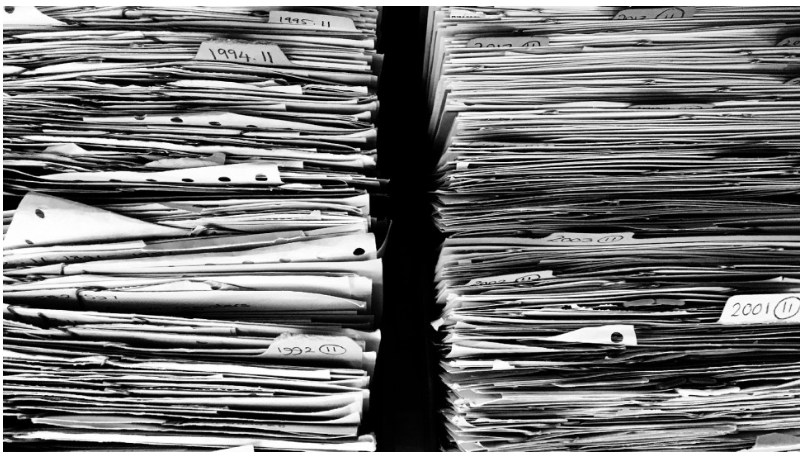
출력물로 인한 보안 사고 걱정 끝. 문서중앙화 솔루션으로 종이 문서까지 안전하게 관리할 수 있습니다.
팬데믹으로 가속화된 디지털 전환으로 인해 많은 기업들이 전자 문서를 도입하고, 사이버 공격에 대한 보안을 강화하고 있습니다.
하지만 아무리 디지털 전환이 진행되고 있다 해도 여전히 출력물 즉, 종이 문서를 업무에서 완벽히 배제할 수는 없는데요.
계약서를 인쇄해서 주고받는 경우도 있고, 업무 관련 보고서나 도면을 출력하여 회의 자료로 사용하기도 하죠.
오랜 세월 업무 전반에서 유용하게 사용해온 종이 문서! 보안 관리에는 치명적인 단점이 있습니다.
바로 인쇄가 되어 나오는 순간부터 누가 이 출력물을 가지고 있는지, 어떻게 활용하고 있는지 추적할 수 없다는 점이죠.
이런 특성을 악용해 도면이나 핵심 기술 관련 자료를 출력하여 회사 밖으로 가지고 나가는 경우가 있습니다.
2020년에 진행된 설문 조사에 의하면 종이 문서 유출로 인해 피해를 입은 기업이 20%에 달한다고 합니다.
하지만 대부분 많은 기업들은 출력물 보안보단 사이버 보안에 더 집중하고 있습니다.
사실상 유출되는 방식이 다를 뿐이지 유출로 인한 경제적, 사회적 손실은 차이가 없음에도 말이죠.
그렇다고 사이버 보안을 위한 솔루션도 도입하고, 출력물 보안을 위한 솔루션도 도입하자니, 금전적인 부담이 적지 않는 상황인데요.
어떻게 해야 사이버 보안도 챙기면서 출력물로 인한 유출 사고를 막을 수 있을까요?
.
.
.
" 사이버다임 문서중앙화 솔루션이 고민 해결해 드리겠습니다! "
◈ 아무나 문서를 출력할 수 없도록 인쇄 제어
출력물 보안을 강화하기 위한 첫 번째 단계! 아무나 마음대로 문서를 출력할 수 없어야 합니다.
당연한 이야기이지만, 모든 사람이 회사 문서를 인쇄할 수 있다면 출력물로 인한 유출 위험성이 높아집니다.
사이버다임 문서중앙화 솔루션은 관리자가 사용자의 인쇄 가능 여부를, 인쇄 제어 기능으로 설정할 수 있습니다!
업무에 있어 출력 기능이 필요한 사용자에겐 인쇄가 가능한 보안 정책을 적용하고, 필요하지 않은 사용자에겐 인쇄 제어 설정한 보안 정책을 적용하면 간편하게 설정 완료~
그 외에 개인 로컬 PC에 저장할 수 있는지, 업무에 사용하는 응용 프로그램 중 어떤 프로그램을 통해 생성되는 문서를 중앙화할 것인지, 화면 캡처를 할 수 있는지 등
세밀하고 구체적으로 보안 정책을 구분할 수 있습니다. 그리고 사이버다임 문서중앙화 솔루션은 보안 정책을 여러 개 생성해 사용자별로 설정할 수 있어 상황에 따라,
업무 특성에 따라 세심하게 보안 요소를 적용할 수 있죠.
예를 들어) A 보안정책은 인쇄는 가능하나 캡처와 로컬 저장은 불가하게, B 보안정책은 캡처와 로컬 저장은 가능하나 인쇄는 못하도록 생성하여
각각의 업무 특성에 맞게 사용자에게 적용하면 됩니다.
◈ 누가 언제 인쇄했는지 흔적 남기기! 워터마크 설정
워터마크란 무단 도용을 막기 위해 사용자만이 알 수 있는 아이디 또는 정보 등의 부호를 삽입하거나 영상, 음성 등의 신호에 삽입한 특정 코드나 유형을 의미합니다.
사이버다임 문서중앙화 솔루션에선 출력한 사람의 흔적을 남기기 위한 워터마크 기능이 있습니다. 출력물에 워터마크가 찍혀 나오도록 설정하면
1)누가 문서를 인쇄했고, 2) 언제 인쇄했는지에 대한 정보를 표시할 수 있죠.
"워터마크가 찍혀있으면 안 되는 서류는 어떻게 인쇄해야 하나요?"
보안을 위해 워터마크를 설정해두지만 출력물 형태로 서류를 기관에 제출해야 하는 경우엔 워터마크가 찍혀서는 안됩니다.
이런 경우, 보안 정책을 유연하게 활용하시면 됩니다! 실제 사이버다임 문서중앙화 고객사 중평소에는 출력물에 워터마크가 나오도록 사용하다
관공서 같은 곳에 서류를 제출해야 할 땐 워터마크 기능을 해제하는 방식으로 활용하는 곳이 있습니다. 물론, 워터마크 해제는
사용자가 개인적으로 할 수 없고 관리자가 설정하기에 승인받은 사람에 한하여 일정 기간 동안 워터마크 기능이 해제된 그룹에 적용하였다
추후 원상 복귀하는 방식으로 운영하고 있죠!
◈ 인쇄하기 전에 문서 접근부터 막자! 섬세한 문서 접근 권한 설정
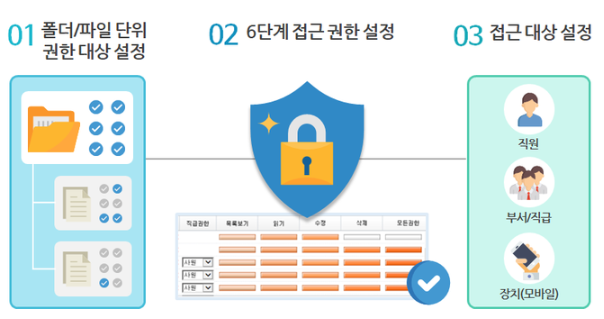
문서를 아무나 출력 못하게 하고, 출력물에 흔적이 남도록 하는 것도 좋지만 중앙 서버에 저장되어 있는 문서의 보안을 강화하는 것도 중요합니다.
문서중앙화 솔루션은 문서를 중앙 서버에 모아서 저장하기에 모든 사용자가 문서를 확인할 수 있어 보안에 더 취약한 거 아닌가 걱정하시는 분들이 있습니다.
하지만 오히려 문서들이 모여 있고 사용자들이 모두 서버에 접근할 수 있으니 권한 설정 기능으로 접근 가능한 사람, 접근 불가능한 사람을 설정 가능합니다.
사용자별, 부서별, 직급별, 장치별로 권한을 설정할 수 있으며 단순히 접근 가능, 불가능으로만 설정하는 것이 아니라 폴더 내 파일의 이름만 볼 수 있는지,
내용까진 조회할 수 있는지, 문서를 수정할 수 있는지, 문서 삭제도 가능한지 혹은 모든 권한을 갖는 지처럼 권한도 세분화하여 설정할 수 있죠.
◈이력 관리로 중복 인쇄 방지하고, 무단 인쇄 위험성 줄이기!
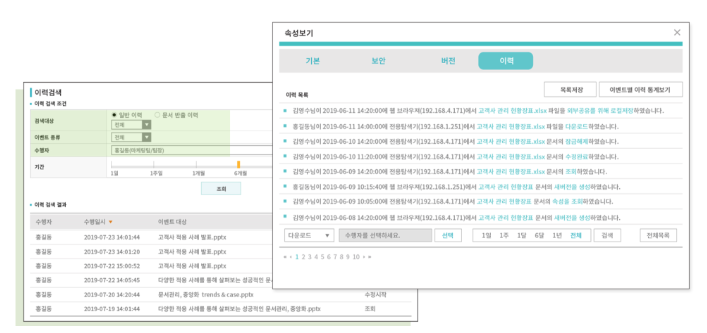
문서중앙화 솔루션은 문서가 생성된 시점부터 문서 관련 이력을 기록합니다. 누가 문서를 조회했는지, 수정했는지, 속성 조회했는지, URL을 생성하였는지
시간, 사용자, IP 등 관련 정보를 확인할 수 있죠. 문서 출력 이력 또한 확인 가능하기에 회의에 필요한 자료를 다른 사람이 인쇄를 했는지, 안 했는지 확인할 수 있어
중복 인쇄를 방지하고, 아무나 문서를 출력하는 무단 인쇄의 위험성도 줄일 수 있습니다.
◈ 종이 문서 유출 위험에서 완전히 벗어나세요! 문서중앙화로 페이퍼리스 환경 조성
출력물 보안 강화만큼 업무 효율 향상 또한 중요한데요. 종이문서 사용을 확실히 줄일 수 있는 해결책도 문서중앙화면 문제 없죠.
작년부터 업무 환경을 디지털로 전환하는 세계적 추세가 지속되고 있습니다. 기업은 물론 정부에서도 디지털 플랫폼 정부를 핵심 과제로 삼아 디지털 전환을 추진하고 있습니다.
종이 없는 업무 환경 조성을 통해 업무 효율 향상과 보안 강화, 더 나아가 탄소 중립까지 한꺼번에 이루고자 하죠.
(+혹시 디지털 뉴딜과 탄소중립이 궁금하신가요? 그렇다면 아래 게시물을 참고해 주세요!)
한국판 뉴딜 l 디지털 전환부터 탄소중립까지. 한 번에 실천할 수 있다?<사이버다임 문서중앙화> ESG경영의 시작
이 모든 것을 이룰 수 있는 페이퍼리스 업무 환경을 문서중앙화 솔루션으로 조성할 수 있습니다!
우선, 종이 없는 업무 환경을 조성하려면,
① 출력물을 생산하지 않아도 업무가 수월하게 진행되어야 하고 ② 인쇄가 필요한 경우엔 출력물이 과도하게 생산되지 않아야 합니다.
문서중앙화 솔루션에 어떤 기능들이 있길래 페이퍼리스 환경 조성이 가능한걸까요?
1. URL을 통한 파일 공유
문서중앙화가 있다면 URL 링크 첨부로 간편하게 파일을 공유할 수 있기에 업무 내용 보고를 위해 문서를 출력하지 않아도 됩니다.
원본 파일을 그대로 보내는 것이 아닌 URL로 파일 위치를 전달하는 방식이라 첨부 파일 용량 제한 걱정 없이 대용량 파일도 빠르게 전달할 수 있고,
URL의 유효 기간과 다운로드 횟수를 제한할 수 있어 보안을 강화할 수 있습니다. 또한 해당 URL로 사용자가 언제 접속하였는지, 파일을 다운로드했는지도
기록되기에 배포 후 보안 관리까지 가능하죠.
2. 버전 관리
'**기획안_최종', '**기획안_최최종', '**기획안_진짜최최최종' 과 같은 파일명, 다들 한 번쯤은 만들어보셨을 겁니다.
여러 사람이 확인해야 하는 자료라면 어떤 파일이 가장 최신본인건지 확인하기 쉽지 않죠.
하지만 문서중앙화 솔루션은 작업 중 저장할 때마다 새로운 버전의 문서가 단일 위치에 저장됩니다.
쉽게 말하자면 v.1, v.2 파일이 각각 만들어져 총 2개의 파일이 생성되는 것이 아니라 1개의 파일에 여러개의 버전으로 저장됩니다.
"파일 하나에 버전들이 저장되면, 문서를 열었을 때 최신 수정 전의 내용들이 전부 보이는 건가요?"
아니요, 문서를 확인하면 가장 최신 버전의 내용만 보이며 이전 버전의 내용은 문서 속성 속 버전 관리에서 확인할 수 있습니다.
그렇기에 기껏 인쇄했는데 최신 문서가 아니라 다시 인쇄해야 하는 경우가 생기지 않아 출력물 과다 생산을 막을 수 있죠.
용지 및 잉크 비용 절감은 물론 출력물로 인한 문서 유출까지 사전에 예방 가능한 문서중앙화 솔루션! 대단하지 않나요?
-
이전글
 문서중앙화 솔루션이란? 주요 특징 알아보기
 -
다음글